Waveshare ESP32-P4 7B as a Home Assistant display
A 7-inch 1024 × 600 touch screen built around the same chips as the Tab5. Bigger, cheaper, with fewer things on board. It has been the screen of my house since 14 October 2026.
- Screen
- 7", 1024 × 600
- Processor
- ESP32-P4 at 400 MHz
- Memory
- 32 MB PSRAM, 32 MB flash
- Radio
- ESP32-C6, 2.4 GHz Wi-Fi
- Status
- Supported since 3.9.0
What changes on screen
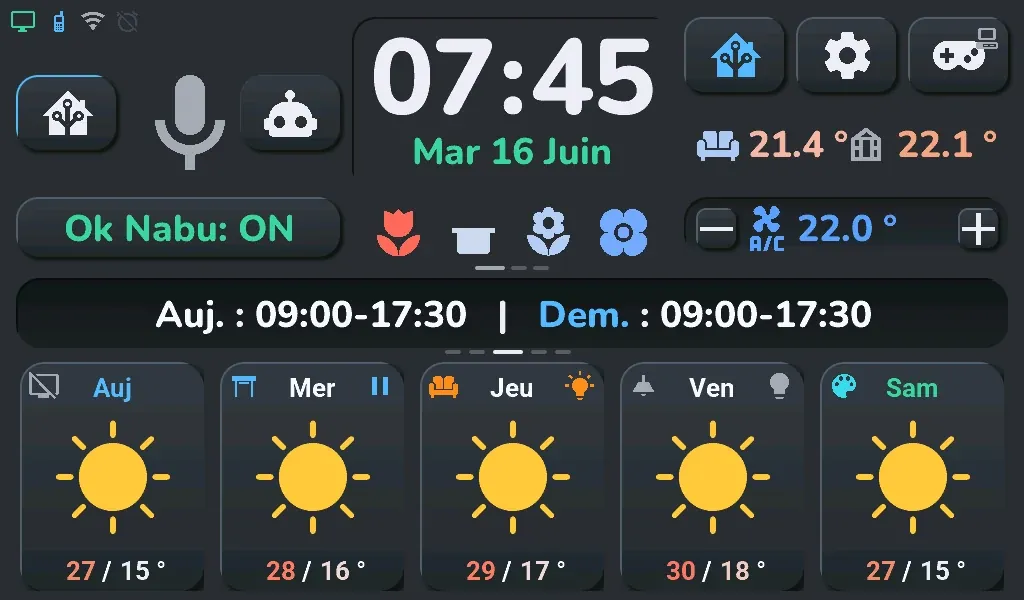
The same firmware as the Tab5, built for this board. The home screen and every popup keep the Tab5's layout, brought down to 1024 × 600: same places, same proportions, smaller. Large fonts are scaled down, small ones keep their size to stay readable. In Home Assistant the board presents itself as a Tab5: the packages and the blueprint find it without any change.
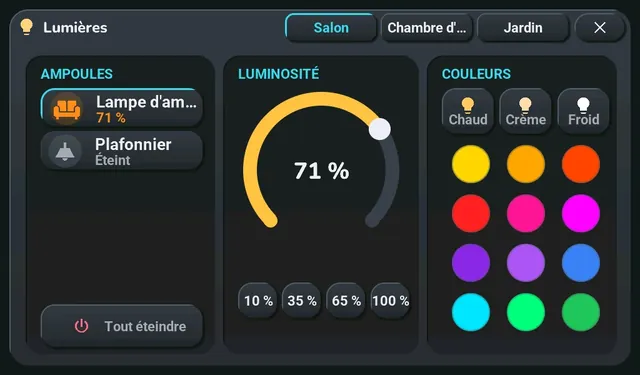
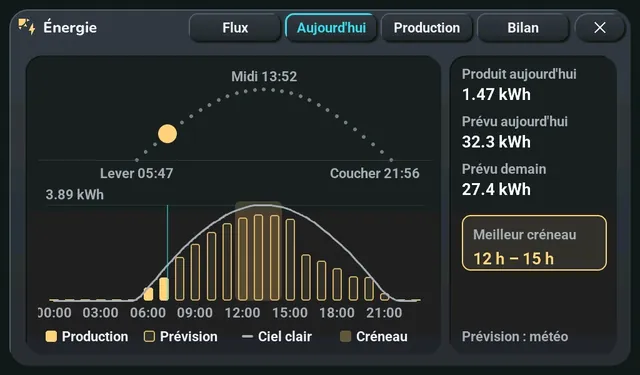
Renders of the firmware on a PC at 1024 × 600, the same pixels as on the board (French screen texts).
The ESPHome configuration
To start from scratch with ESPHome on this board: a short, complete example that brings up the display, the touch, Wi-Fi and the backlight, shows a Home Assistant temperature and turns a light on. Replace the two entities with your own.
# Waveshare ESP32-P4-WIFI6-Touch-LCD-7B with ESPHome and Home Assistant: display, touch, Wi-Fi
# and backlight, a Home Assistant temperature in the middle and a button that turns a light on.
# Pins and settings of the "Home Assistant display" firmware (3.9.0), which runs on the board;
# this example itself is compiled with ESPHome 2026.9.1 but not tried as is.
esphome:
  name: waveshare-7b
  friendly_name: Waveshare 7B
  # ESPHome 2026.9.0 crashes while setting up the display of an ESP32-P4 revision 3: 2026.9.1 at
  # least.
  min_version: 2026.9.1

esp32:
  variant: esp32p4
  # ESP32-P4 revision 3 (production silicon), whose normal frequency is 400 MHz.
  engineering_sample: false
  cpu_frequency: 400MHz
  flash_size: 32MB
  framework:
    type: esp-idf
    advanced:
      enable_idf_experimental_features: true
      execute_from_psram: true

# At its default speed, the PSRAM gave about thirty "lcd.dsi underrun" per second.
psram:
  mode: hex
  speed: 200MHz

# Wi-Fi is on a second chip, an ESP32-C6, linked over SDIO. Its reset (GPIO54) is active high:
# false gives "sdmmc_card_init failed".
esp32_hosted:
  variant: esp32c6
  active_high: true
  clk_pin: GPIO18
  cmd_pin: GPIO19
  d0_pin: GPIO14
  d1_pin: GPIO15
  d2_pin: GPIO16
  d3_pin: GPIO17
  reset_pin: GPIO54
  slot: 1
  sdio_frequency: 20MHz
  use_psram: true

wifi:
  ssid: !secret wifi_ssid
  password: !secret wifi_password
  ap:
    ssid: "Waveshare 7B fallback"

captive_portal:

api:
  encryption:
    key: !secret api_encryption_key
  # With no Home Assistant connected, ESPHome restarts after 15 min by default.
  reboot_timeout: 60min

ota:
  - platform: esphome

logger:
  hardware_uart: USB_SERIAL_JTAG

# Bus of the GT911 touch and of the audio chips.
i2c:
  - id: bsp_bus
    sda: GPIO7
    scl: GPIO8
    frequency: 400kHz

# Supply of the display's MIPI-DSI link: LDO 3 at 2.5 V.
esp_ldo:
  - voltage: 2.5V
    channel: 3

# EK79007 panel: ESPHome's model knows the board (GPIO33 reset included).
display:
  - id: panel
    platform: mipi_dsi
    model: WAVESHARE-ESP32-P4-WIFI6-TOUCH-LCD-7B
    dimensions:
      width: 1024
      height: 600
    pixel_mode: 16bit
    color_order: RGB
    update_interval: never
    auto_clear_enabled: false

# Waveshare's code says the GT911 reset is not connected, but it is on GPIO23: without it and
# without both mirrors, one touch recognised in five minutes.
touchscreen:
  - id: touch
    platform: gt911
    reset_pin: GPIO23
    update_interval: 50ms
    transform:
      swap_xy: false
      mirror_x: true
      mirror_y: true

# Backlight: inverted output, at 5 kHz.
output:
  - platform: ledc
    id: backlight_pwm
    pin:
      number: GPIO32
      inverted: true
    frequency: 5000Hz

light:
  - platform: monochromatic
    id: backlight
    name: "Backlight"
    output: backlight_pwm
    restore_mode: RESTORE_DEFAULT_ON

# Replace with your own entities. For the button, tick "Allow the device to perform Home
# Assistant actions" in Home Assistant (options of the ESPHome device).
sensor:
  - platform: homeassistant
    id: living_room_temperature
    entity_id: sensor.living_room_temperature
    on_value:
      - lvgl.label.update:
          id: temperature_label
          text:
            format: "%.1f °C"
            args: [x]

# LVGL's built-in fonts have no accented letters: Roboto, downloaded at build time (it only
# lacks combining accents, hence ignore_missing_glyphs).
font:
  - file: "gfonts://Roboto"
    id: font_text
    size: 28
    glyphsets: [GF_Latin_Core]
    ignore_missing_glyphs: true
  - file: "gfonts://Roboto@700"
    id: font_big
    size: 64
    glyphsets: [GF_Latin_Core]
    ignore_missing_glyphs: true

lvgl:
  displays: [panel]
  touchscreens: [touch]
  # The panel is mounted upside down compared with its driver: 180 for the board the right way
  # up, 0 if you mount it upside down. The touch follows by itself.
  rotation: 180
  color_depth: 16
  byte_order: little_endian
  buffer_size: 100%
  default_font: font_text
  pages:
    - id: home_page
      widgets:
        - label:
            id: temperature_label
            align: CENTER
            y: -70
            text: "--"
            text_font: font_big
        - button:
            align: CENTER
            y: 100
            width: 320
            height: 100
            widgets:
              - label:
                  align: CENTER
                  text: "Living room light"
            on_click:
              - homeassistant.action:
                  action: light.toggle
                  data:
                    entity_id: light.living_room
Validated and compiled with ESPHome 2026.9.1 on 2026-10-28, not tried as is on the board: its pins and settings are those of the full firmware, which runs on mine.
Each unusual setting is explained in a comment, and the problem it solves just below. Two things are not in it: the sound (ES8311 and amplifier, two microphones on an ES7210) and the full reset after a software restart; they are in carte-waveshare-7b.yaml, the board's file in the full firmware. The same board without Home Assistant: Vigie on the 7B.
Problems solved when it arrived
All already fixed in the firmware; useful if you start from scratch with ESPHome on this board.
- Boot loops: ESPHome 2026.9.0 crashes when setting up the display of revision 3 ESP32-P4 chips; ESPHome 2026.9.1 at least is needed.
- No Wi-Fi: the ESP32-C6 reset is active high, as on the Tab5.
- Touch almost dead: the panel is mounted upside down relative to the driver, and the GT911 touch controller must be reset through GPIO 23.
- Clipping speaker: the ES8311 driver goes up to +32 dB; the volume is capped at 0 dB and its bottom raised, for clean sound across the slider.
- Boot loop after a software restart: the link with the Wi-Fi chip stayed stuck; every restart now resets the whole digital core.
What the board does not have
- No motion sensor: the eight games are left out by default (you can add them by building yourself, but the tilt games get no input).
- No clock chip: the time comes from the network at each boot; after a power cut, the alarm waits for the Wi-Fi.
- A battery connector, but no gauge: this firmware does not read the battery yet.
- No headphone jack, and 2.4 GHz Wi-Fi only.
Install it
- Connect the ESP32-P4's USB-C port to the computer and open the install page in Chrome or Edge.
- Pick "Waveshare ESP32-P4 7B", install, then give it the Wi-Fi.
- Follow the same Home Assistant steps as for a Tab5.
Updates then come through Home Assistant, from this board's own folder. Board mounted upside down? The device's "Screen direction" setting in Home Assistant flips the image at once, without rebuilding. Replacing a Tab5? Disable the old device in Home Assistant first.
Not yet tried from the install page on a real board: mine got the published firmware through an over-the-air update. Not checked on the board either: the microphone and wake word, cameras. If you try it, tell us in the Discussions.
Measured on the board
- Boot: backlight at 1 s, first image at 4.8 s, Wi-Fi at 9.4 s.
- Power draw at the USB input: 1.56 W on the home screen at the usual brightness (USB meter, average at 100 samples per second), 3.1 W with the screen at 100%, 1.2 W with the screen off.
- Components: EK79007 MIPI-DSI display, GT911 touch, ES8311 sound and NS4150B amplifier, two microphones on an ES7210, 17 free GPIOs on two connectors.
Details (pins, schematic, measuring method) are in the 7B documentation. The original tablet: the M5Stack Tab5 and its versions.