Vigie on the Waveshare ESP32-P4 7B
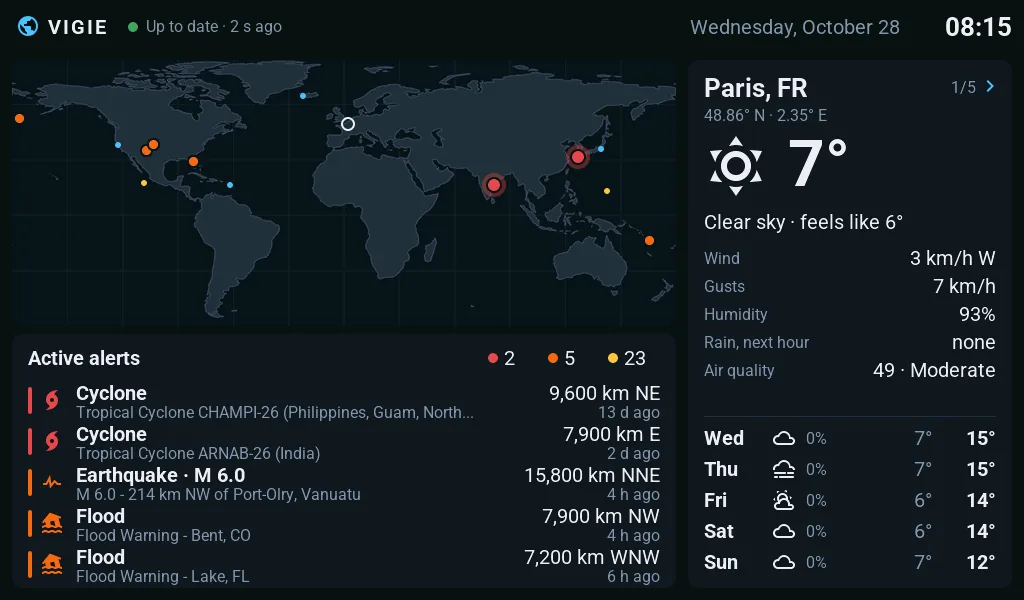
The 7-inch board as a standalone alert display: the world map of current hazards, the five most severe and the weather of your zones. ESPHome without Home Assistant: the screen fetches its data by itself, over Wi-Fi.
- Screen
- 7", 1024 × 600
- Firmware
- ESPHome 2026.9.1+, LVGL
- Home Assistant
- Not needed
- Data
- Vigie API, every minute
- Status
- Tested on the board on 2026-10-20
Vigie does not replace official warnings: always follow the instructions of your authorities.
What the screen shows
The Vigie layout is drawn for this screen, to the pixel: the status bar (link to the API, date and time of the zone), the world map with hazards as dots coloured by severity, the five most severe with their distance and direction, and the weather panel of the zone. Touch the panel to go to the next zone.
Each part in detail, and what the screen does when the API stops answering: the Vigie alert display.
The ESPHome configuration, without Home Assistant
No api: component: nothing links the screen to Home Assistant. Wi-Fi is given after the install (Improv over USB, or the access point the screen opens by itself), the data comes through http_request and LVGL draws it.
Below, a short, complete example on the same hardware base as Vigie: it shows the temperature and the weather warning of a place, read from the public Vigie API. Change the latitude and longitude, or the address, to read another API.
# Waveshare ESP32-P4-WIFI6-Touch-LCD-7B with ESPHome, without Home Assistant: display, touch,
# Wi-Fi and backlight, and the screen reads a web API by itself to show the temperature and the
# weather warning of a place (the /v1/point route of the public Vigie API). Pins and settings of
# the Vigie display firmware, which runs on the board; this example itself is compiled with
# ESPHome 2026.9.1 but not tried as is.
substitutions:
  # The place shown (Paris here).
  latitude: "48.86"
  longitude: "2.35"

esphome:
  name: waveshare-7b-standalone
  friendly_name: Waveshare 7B standalone
  # ESPHome 2026.9.0 crashes while setting up the display of an ESP32-P4 revision 3: 2026.9.1 at
  # least.
  min_version: 2026.9.1

esp32:
  variant: esp32p4
  # ESP32-P4 revision 3 (production silicon), whose normal frequency is 400 MHz.
  engineering_sample: false
  cpu_frequency: 400MHz
  flash_size: 32MB
  framework:
    type: esp-idf
    advanced:
      enable_idf_experimental_features: true
      execute_from_psram: true

# At its default speed, the PSRAM gave about thirty "lcd.dsi underrun" per second.
psram:
  mode: hex
  speed: 200MHz

# Wi-Fi is on a second chip, an ESP32-C6, linked over SDIO. Its reset (GPIO54) is active high:
# false gives "sdmmc_card_init failed".
esp32_hosted:
  variant: esp32c6
  active_high: true
  clk_pin: GPIO18
  cmd_pin: GPIO19
  d0_pin: GPIO14
  d1_pin: GPIO15
  d2_pin: GPIO16
  d3_pin: GPIO17
  reset_pin: GPIO54
  slot: 1
  sdio_frequency: 20MHz
  use_psram: true

# No "api:": nothing links the screen to Home Assistant. No password in the file: Wi-Fi is given
# after the install, over USB (Improv, from ESPHome Web) or through the "Waveshare 7B setup"
# access point and its settings page.
wifi:
  ap:
    ssid: "Waveshare 7B setup"

improv_serial:

captive_portal:

ota:
  - platform: esphome

logger:
  hardware_uart: USB_SERIAL_JTAG

# Bus of the GT911 touch and of the audio chips.
i2c:
  - id: bsp_bus
    sda: GPIO7
    scl: GPIO8
    frequency: 400kHz

# Supply of the display's MIPI-DSI link: LDO 3 at 2.5 V.
esp_ldo:
  - voltage: 2.5V
    channel: 3

# EK79007 panel: ESPHome's model knows the board (GPIO33 reset included).
display:
  - id: panel
    platform: mipi_dsi
    model: WAVESHARE-ESP32-P4-WIFI6-TOUCH-LCD-7B
    dimensions:
      width: 1024
      height: 600
    pixel_mode: 16bit
    color_order: RGB
    update_interval: never
    auto_clear_enabled: false

# Waveshare's code says the GT911 reset is not connected, but it is on GPIO23: without it and
# without both mirrors, one touch recognised in five minutes.
touchscreen:
  - id: touch
    platform: gt911
    reset_pin: GPIO23
    update_interval: 50ms
    transform:
      swap_xy: false
      mirror_x: true
      mirror_y: true

# Backlight: inverted output, at 5 kHz.
output:
  - platform: ledc
    id: backlight_pwm
    pin:
      number: GPIO32
      inverted: true
    frequency: 5000Hz

light:
  - platform: monochromatic
    id: backlight
    name: "Backlight"
    output: backlight_pwm
    restore_mode: RESTORE_DEFAULT_ON

# The screen fetches its data by itself, over HTTPS. verify_ssl: false: the server certificate
# is not checked, as in Vigie display; fine for public data, never for a password.
http_request:
  id: web
  timeout: 8s
  verify_ssl: false

interval:
  # /v1/point takes 10 requests per minute and per address: one every 5 minutes is plenty.
  - interval: 5min
    startup_delay: 10s
    then:
      - if:
          condition:
            wifi.connected:
          then:
            - http_request.get:
                url: "https://vigie.auxfilsdesidees.fr/v1/point?lat=${latitude}&lon=${longitude}"
                capture_response: true
                max_response_buffer_size: 16384
                on_response:
                  then:
                    - lambda: |-
                        if (response->status_code != 200) {
                          ESP_LOGW("exemple", "HTTP %d", response->status_code);
                          return;
                        }
                        json::parse_json(body, [](JsonObject root) -> bool {
                          // Highest weather warning at the point: GREEN, YELLOW, ORANGE or RED.
                          std::string level = root["local_alert_level"] | "";
                          const char *text = "No warning";
                          uint32_t colour = 0x3FA34D;
                          if (level == "YELLOW") { text = "Yellow warning"; colour = 0xF2C230; }
                          if (level == "ORANGE") { text = "Orange warning"; colour = 0xF08A24; }
                          if (level == "RED") { text = "Red warning"; colour = 0xE5484D; }
                          lv_label_set_text(id(level_label), text);
                          lv_obj_set_style_text_color(id(level_label), lv_color_hex(colour), LV_PART_MAIN);
                          // A missing value stays missing: nothing is made up.
                          JsonVariant temperature = root["current"]["temp_c"];
                          if (temperature.is<float>()) {
                            char value[16];
                            snprintf(value, sizeof(value), "%.1f °C", temperature.as<float>());
                            lv_label_set_text(id(temperature_label), value);
                          }
                          return true;
                        });
                on_error:
                  then:
                    - logger.log: "No answer (network or timeout)"

# LVGL's built-in fonts have no accented letters: Roboto, downloaded at build time (it only
# lacks combining accents, hence ignore_missing_glyphs).
font:
  - file: "gfonts://Roboto"
    id: font_text
    size: 28
    glyphsets: [GF_Latin_Core]
    ignore_missing_glyphs: true
  - file: "gfonts://Roboto@700"
    id: font_big
    size: 64
    glyphsets: [GF_Latin_Core]
    ignore_missing_glyphs: true

lvgl:
  displays: [panel]
  touchscreens: [touch]
  # The panel is mounted upside down compared with its driver: 180 for the board the right way
  # up, 0 if you mount it upside down. The touch follows by itself.
  rotation: 180
  color_depth: 16
  byte_order: little_endian
  buffer_size: 100%
  default_font: font_text
  pages:
    - id: home_page
      widgets:
        - label:
            id: temperature_label
            align: CENTER
            y: -50
            text: "--"
            text_font: font_big
        - label:
            id: level_label
            align: CENTER
            y: 70
            text: "Waiting for data"
Validated and compiled with ESPHome 2026.9.1 on 2026-10-28, not yet tried as is on the board: its hardware settings are those of Vigie display, which runs on mine.
The settings that matter on this board
- ESPHome 2026.9.1 at least: 2026.9.0 crashes while setting up the display of ESP32-P4 revision 3 chips.
- Wi-Fi goes through the ESP32-C6, linked over SDIO (
esp32_hosted); its reset, GPIO54, is active high. - PSRAM at 200 MHz: at its default speed, the display dropped out about thirty times a second ("lcd.dsi underrun").
- The GT911 touch has its reset on GPIO23, even though Waveshare's code says it is not connected, and it is mirrored in X and Y.
- The backlight is an inverted output on GPIO32, at 5 kHz.
- Picture direction: the panel is mounted upside down compared with its driver, hence
rotation: 180for a board the right way up, 0 for a board mounted upside down. Vigie display starts from 0, the way my board is mounted: add-s board_rotation 180if the picture is upside down. - After a software restart, the link to the ESP32-C6 may not come back until a power cut. Vigie display turns every software restart into a reset of the whole digital core (c6_link.cpp); the example does not.
The full firmware
vigie.yaml puts packages together: the board hardware (board-waveshare-7b.yaml), the size of the screen, the world map and the fonts (layout-waveshare-7b.yaml), the LVGL screen, drawn in C++, and the API client: one request a minute, a frame refused if its size or checksum does not match.
Install Vigie
No published release to install from the browser yet: you build the firmware yourself. Allow half an hour, mostly for the first build.
- Install ESPHome 2026.9.1 or newer and get the vigie-display repository.
- Create a signing key: once installed, the screen only accepts updates signed with the same key. Keep a copy.
- Build: the 7B is the default board.
esphome -s vigie_api_url https://vigie.auxfilsdesidees.fr -s vigie_signing_key vigie_signing_key.pem compile vigie.yaml, then install over USB with ESPHome or from ESPHome Web. - Give it Wi-Fi over USB (Improv) or through the "Vigie setup" access point the screen opens after a minute. Within a minute, the status bar reads "Up to date".
Settings and common problems are in the installation guide. Later updates go over Wi-Fi. The same board as a Home Assistant display: the Waveshare 7B.